A timeline that behaves like one
Drag clips, trim their edges, split at the playhead, ripple delete to close the gap. Snapping is on and Alt suppresses it. Markers land where you need to come back to. A hundred steps of undo sit behind all of it.
A multi-track timeline, real export control, and nothing in the way. No watermark on what you export, no account to create, no subscription, and no upload: your footage never leaves your machine.
There is no paid version of this, so there is nothing for you to be upgraded to later.
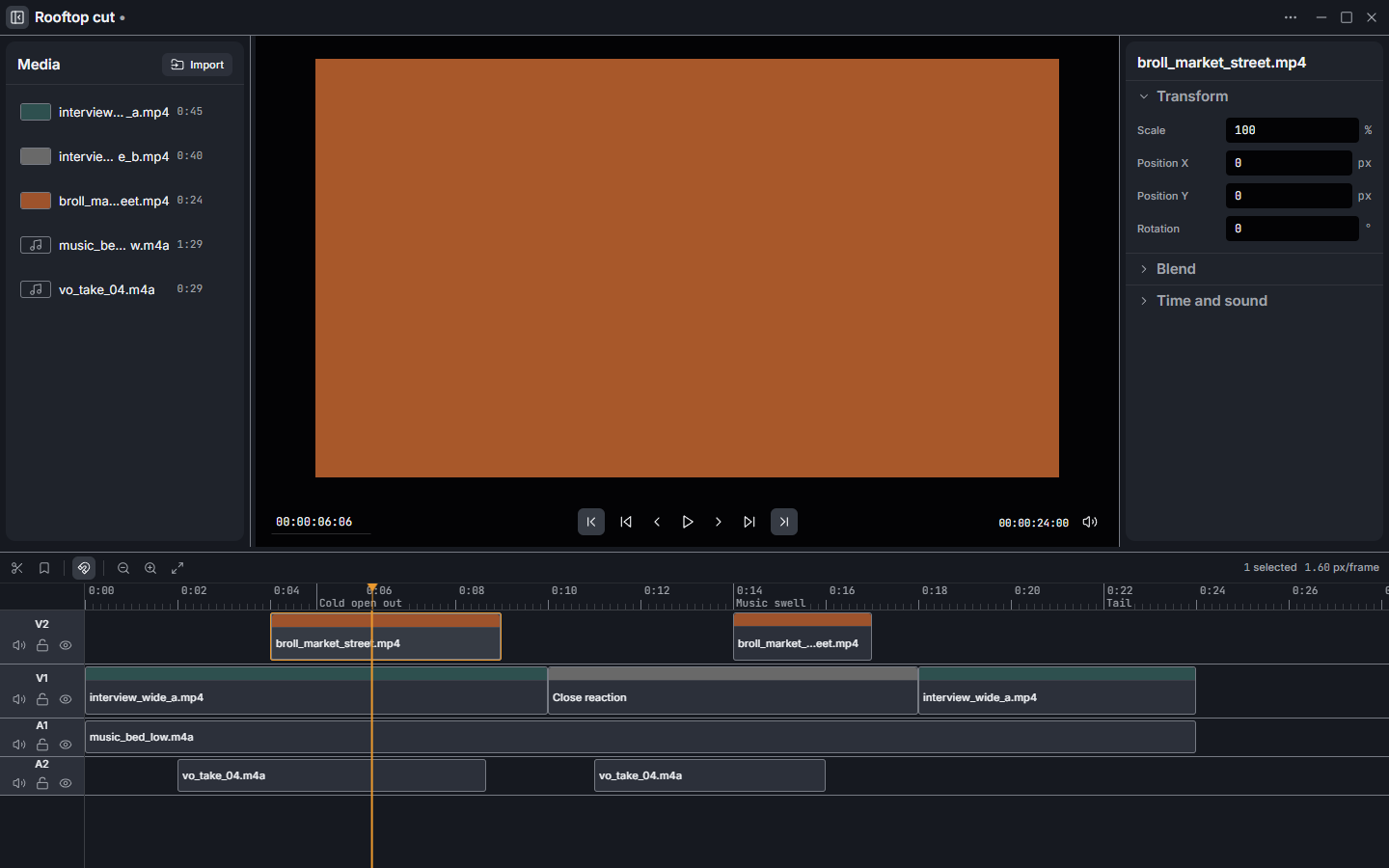
Medrak Cut is a free desktop video editor for Windows that imports video and audio, arranges and trims them on a multi-track timeline, and exports H.264, H.265 or ProRes through ffmpeg. There is no charge for it, nothing is stamped on what you export, your footage is never uploaded, and the licence does not run out.
It exists because the two ends of the market both cost you something. Professional editors charge a monthly fee and open onto a wall of panels before you can touch a frame. Free consumer editors take the fee away and take the control with it, then stamp a logo on the corner of your export or ask you to subscribe to remove it. Medrak Cut is the middle: open it and start cutting, but never hit a ceiling you cannot get past.
| Price | Free. No paid tier, no trial, no in-app purchase. |
|---|---|
| Watermark | None, at any resolution or quality. |
| Account | None. There is no sign-in screen. |
| Internet | Not required. Works fully offline. |
| Telemetry | None collected. |
| Platform | Windows 10 and 11, 64-bit. No macOS or Linux build yet. |
| Export video | H.264, H.265, ProRes. Chosen size, frame rate and quality. |
| Export audio | AAC, MP3, WAV. Stereo 48 kHz. |
| Tracks | Multiple video and audio tracks. Audio tracks mix. |
| Undo | 100 steps. |
| Project file | .veproj, plain JSON you can read and diff. |
| ffmpeg | Bundled. Nothing to install first. |
| Licence | GPLv3. No restriction on what you make with it. |
| Download size | About 155 MB, installer or portable. |
Drag clips, trim their edges, split at the playhead, ripple delete to close the gap. Snapping is on and Alt suppresses it. Markers land where you need to come back to. A hundred steps of undo sit behind all of it.
Play and pause on Space, shuttle with J K L, step a frame at a time with the arrow keys, and set in and out points with I and O to export just the part you care about.
Shift+D lifts a clip's sound onto its own track. Picture and sound stay linked, so selecting either selects both and every move, trim, split and delete applies to the pair in one undo step. Link any clips with Ctrl+L.
Pick the codec, the frame size, the frame rate and the quality. Export the whole timeline or the in-to-out range. One ffmpeg process, honest progress, a cancel button that actually cancels.
A project is a .veproj file: plain JSON, readable in a text editor,
diffable, and safe to keep in version control. Double-click one and it opens in the
window already running.
A snapshot of the open project is written a couple of seconds after you stop editing, and never less often than every twenty seconds while there is unsaved work. A crash or a power cut costs at most twenty seconds. Closing with unsaved changes stops and asks.
Most editors advertised as free are free in one of a few specific ways. Here is what each of them actually costs you, and where Medrak Cut sits.
| The usual catch | What it costs you | Medrak Cut |
|---|---|---|
| Watermarked exports | A logo on your video until you pay | No watermark, ever |
| Free tier of a subscription | Resolution caps, export limits, a monthly bill to lift them | Nothing to cap |
| Time-limited trial | Your project held hostage on day 15 | No expiry |
| Account required | An email address, a password, a mailing list | No account at all |
| Cloud editor | Your footage uploaded, your edit gone if the site goes | Local files, local export |
| Free but watching | Usage telemetry, ad profiles, "anonymous" analytics | Nothing collected |
The keyboard is the primary instrument: direct manipulation for spatial work, keys for everything else. Press ? in the app for this same list.
| Space | Play or pause |
|---|---|
| J K L | Shuttle back, stop, shuttle forward |
| ← → | Step one frame |
| Shift+← → | Step one second |
| Home End | Go to start or end |
| I O | Mark in, mark out |
| Ctrl+Z | Undo |
| Ctrl+Shift+Z | Redo |
| Ctrl+I | Import media |
| Ctrl+E | Export |
| S | Split at playhead |
|---|---|
| Delete | Lift selection |
| Shift+Delete | Ripple delete |
| M | Add marker |
| Shift+D | Detach audio |
| Ctrl+L | Link selected clips |
| Ctrl+Shift+L | Unlink |
| + - | Zoom in, zoom out |
| Shift+Z | Zoom to fit |
| Esc | Clear selection |
These are decisions and honest gaps, not bugs. Better you know now than after a 155 MB download.
Medrak Cut has no paid tier and never will, so donating unlocks nothing. It buys the time that keeps the tool free: the next bug fix, the next export format, the macOS build. Give whatever it is worth to you, once, and nothing recurring is ever set up.
Not in a position to give? Telling one person it exists helps just as much.
Yes. Free to download and free to use, with no trial period, no feature behind a payment, no watermark and no subscription. There is no paid tier to upgrade to. Donations are welcome and change nothing if you never give one.
No. Exports come out of ffmpeg from your own footage and carry no watermark, logo or badge, at any resolution or quality setting.
No. There is no sign-up, no sign-in and no account. The app has no login screen because it has no server to log in to.
No. Every file stays on your disk. Editing and exporting run locally, there is no cloud rendering, and no telemetry is collected. It works with the network switched off.
Windows 10 and Windows 11, 64-bit only. There is no macOS or Linux build today. Nothing in the code is Windows-specific, so those may follow, but neither has been packaged or tested and it would be dishonest to list them.
H.264, H.265 and ProRes, at a resolution, frame rate and quality you choose, over the whole timeline or just the in-to-out range. The audio mix can also be exported alone as AAC, MP3 or WAV.
No. ffmpeg and ffprobe ship inside the installer, which is most of its 155 MB. If a
system copy is on your PATH the app falls back to it, but nothing has to be
installed first. "Install ffmpeg first" is not an installer.
The installer is not code-signed, so SmartScreen shows "Windows protected your PC" the first time you run it. Choose More info, then Run anyway. Signing means buying a publisher certificate, which a tool with no revenue does not have. If you would rather verify the download yourself, every release is published on GitHub with a SHA-512 for each file.
Yes. There is no restriction on what you make with it and no attribution requirement on your video. The application itself is distributed under GPLv3, because it bundles a GPL build of ffmpeg.
That the feature list is shorter than a paid editor's. No transitions, no titles, no effects, no colour grading, Windows only, and an installer Windows will warn you about because it is unsigned. Everything it does do, it does without asking you for anything.